
What learning means
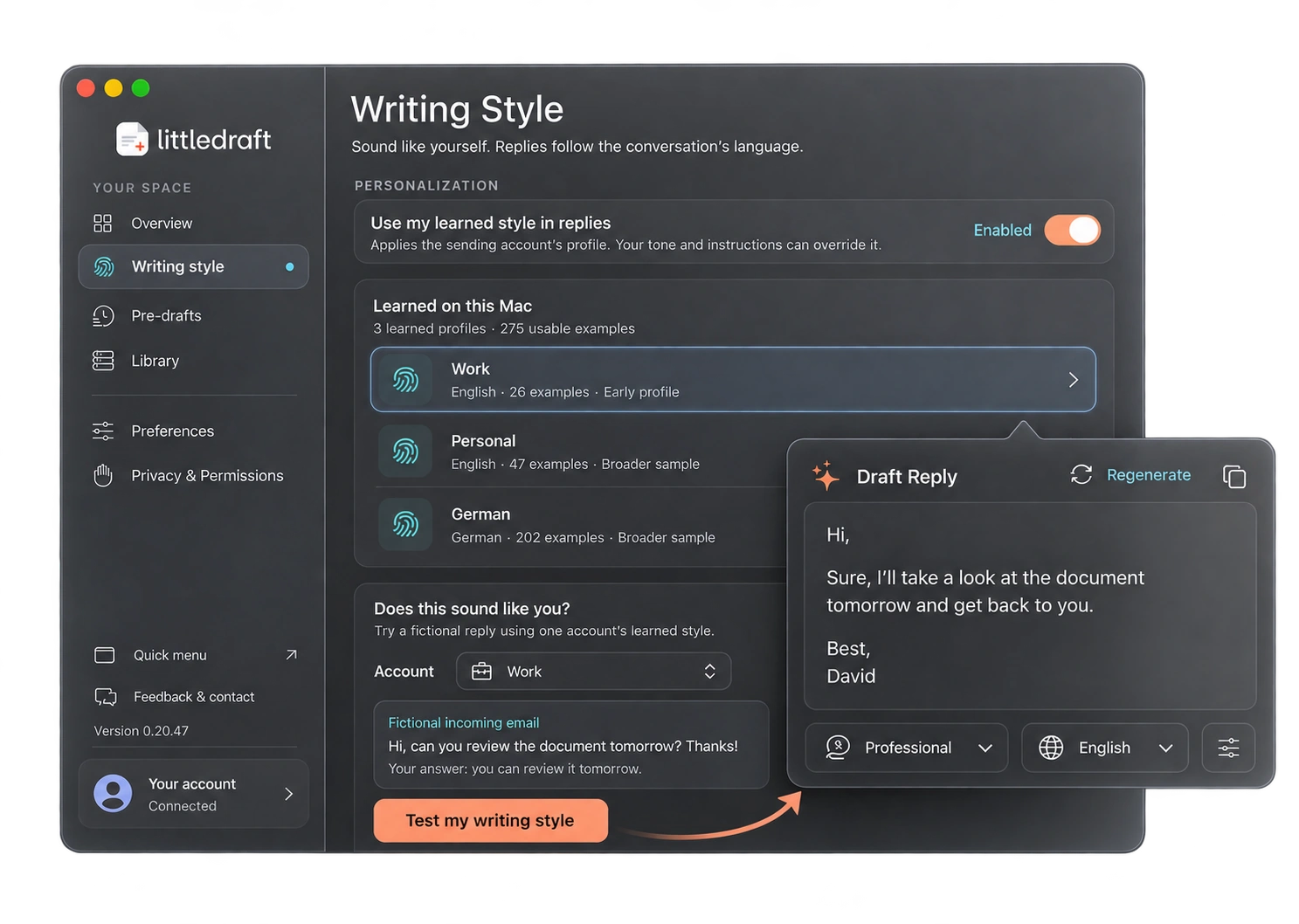
LittleDraft samples sent messages you select and derives writing habits, such as greetings, phrasing, formality, and closing patterns. It keeps a separate profile for each Mail account. This is local style analysis, not fine-tuning Apple’s or a cloud provider’s model, and it does not teach the model your company’s policies or factual knowledge.
Set up an account profile
- Open Writing style from the app’s workspace.
- Choose the Mail accounts and Sent folders you want included. Check that Mail has downloaded the messages you expect.
- Select the relevant time range. Available periods are bounded; the app does not scan beyond the three-year limit.
- Start the tone sample. Leave Mail available while it checks messages.
- Review the usable-example count and readiness for each account, then enable “Use my learned style in replies.”
A small initial sample aims for about 40 useful examples per account. Some messages are unsuitable, so checked messages and usable examples are different counts. A finished sample needs at least five usable examples; a profile based on fewer than 30 useful examples is labelled as an early profile. You can gather more or refresh later. Sampling duration depends on Mail and the selected folders.
Work and personal voices stay distinct
Work profile: Short acknowledgement, direct next step, restrained wording.
Hi Alex,
Thanks for sending this. I can review it tomorrow and get back to you with comments.
Personal profile: A warmer acknowledgement and more casual phrasing.
Hey Alex,
Thanks for sharing it! I’ll have a look tomorrow and let you know what I think.
These are fictional examples of style differences. The actual profile and conversation determine the output.
Test and adjust
Use “Test my writing style” with the chosen account. The test uses a fictional incoming message and derived style hints, rather than sending your historical email archive as a test prompt. In Cloud AI it is a generation request and uses a reply credit. Use the available feedback controls to guide that account’s style, then generate another sample to see the effect.
Control what is shared
Profiles are encrypted locally. In Cloud AI, derived hints and any separately authorized context can accompany a drafting request. Sharing historical examples is a separate choice where offered; local learning does not imply permission to share your entire Sent folder. Private Mode uses the compact profile on the Mac.
Refresh or remove a profile
Refresh when your role or writing habits change. Disabling learned style stops its use in replies; deleting a profile removes that saved profile. Neither action deletes sent mail. If a profile seems wrong, verify the account, folder, time range, and sample language before collecting a larger sample.
Learned traits in 0.20.57
Writing Style now shows measured traits from your replies, including typical length, greeting and sign-off. These traits help explain the learned profile; they do not train or fine-tune Apple’s model. Private AI also follows your chosen tone and length.